I’ve been tracking the AI engineering job market for a few months now, manually. Copy a job description, paste it into a spreadsheet, fill in columns. Company, role, stack, salary. Repeat.
It’s exactly the kind of work you should never do manually.
So I automated it.
The problem
I’m already on LinkedIn regularly, mostly reading posts from people I follow. Job postings are right there too. But I didn’t want to spend time building and maintaining scrapers. More importantly, I don’t want everything, I want signal. I know which local companies I’d never work for. Pulling all of them in would just pollute the data. And I’m specifically interested in new companies appearing in the market, not the same usual names I’ve already filtered out mentally. A scraper doesn’t know any of that. I do.
So I didn’t want automation that pulls everything. I wanted a filter, my own judgment, built into the collection step. If I see a posting worth tracking, I track it. If not, I scroll past.
When you’re researching a job market, you’re trying to answer questions like:
- What tech stack shows up in 80% of postings?
- Are companies actually paying for senior roles or just labelling mid roles as senior?
- What’s the real salary range, not the inflated LinkedIn headline?
A single job posting doesn’t tell you much. Twenty postings, properly structured, tell you everything.
The solution
A Telegram bot that does the extraction automatically.
When I find a job posting I want to track, I copy the full description and paste it into the Telegram chat. Claude extracts the structured data and logs it to Google Sheets. That’s it.
When I want a report, I send /report. Claude reads all logged postings and returns a pattern analysis directly in Telegram. After 20 postings, this is what came back:
📊 Job Market Report — 20 postings

🔧 Top Skills
• Python (19/20 roles)
• LLM/GenAI experience (18/20 roles)
• RAG systems (10/20 roles)
• Prompt engineering (10/20 roles)
• Docker & Kubernetes (8/20 roles)
• API development (8/20 roles)
• Cloud platforms AWS/Azure (8/20 roles)
• Vector databases (7/20 roles)
• Production deployment (12/20 roles)

💰 Salary Range
• Mid: €2,000–€6,600/month
• Senior: €5,500–€6,500/month
• Average Mid: ~€4,200
• Average Senior: ~€6,000

📈 Seniority
• Mid: 70% | Senior: 25% | Junior: 5%

🏭 Domains
• SaaS, Fintech, Healthcare, Other (construction/logistics/classifieds)

💡 Key Signal
Market demands production-ready AI engineers who ship working LLM
systems to real clients, not researchers or prototype builders.
Emphasis on end-to-end ownership, business impact, and moving fast
with modern AI stacks.
That’s the kind of signal that actually changes what you study next.
How it works
The workflow runs in n8n and has two paths:
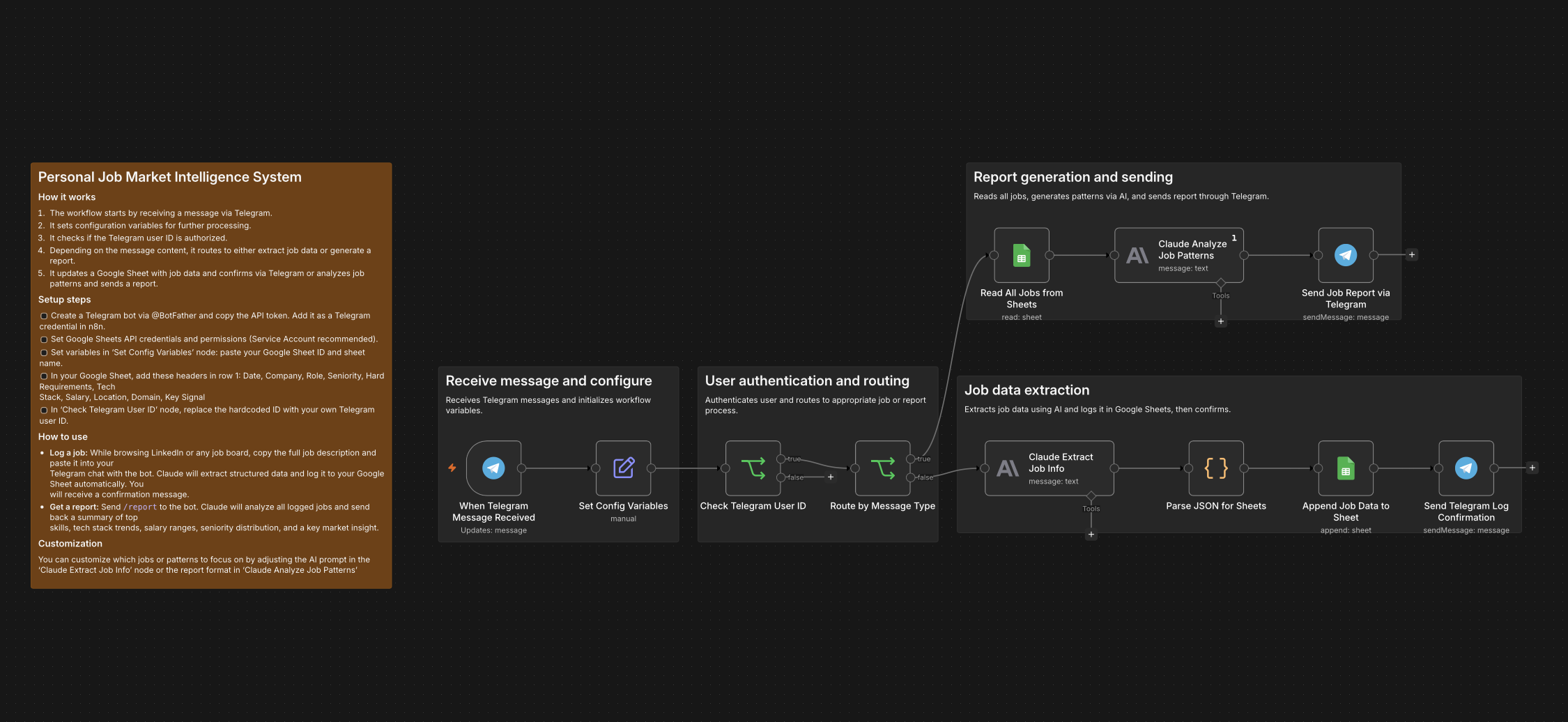 Add screenshot of the n8n workflow here before publishing
Log a job:
- Telegram Trigger receives the message
- Auth check, only my user ID can trigger it
- Claude Haiku extracts structured fields from the raw text: company, role, seniority, tech stack, salary, location, domain, key signal
- Data gets appended to Google Sheets
- Telegram sends back a confirmation
Get a report:
- Send
/reportto the bot - Workflow reads all rows from the sheet
- Claude analyzes patterns across all postings
- Report arrives in Telegram, formatted for mobile, no tables
The whole thing runs on n8n with a Telegram bot, Google Sheets (Service Account), and the Anthropic API. No servers, no dashboards. Just a Telegram chat and a spreadsheet.
What I actually learned
Claude Haiku is fast and cheap enough to run on every message. I was worried about cost, it’s negligible. A thousand job postings would cost less than a coffee.
The extraction prompt matters more than the model. Haiku works fine here because the task is structured and well-defined. Clear output schema, explicit instructions, no ambiguity. The model doesn’t need to think hard, it needs to be consistent.
Telegram is underrated as a personal automation interface. No frontend to build, no auth to manage. You already have the app on your phone. For personal tools that only need to work for you, it’s the fastest interface that exists.
Good workflow structure is documentation. When I submitted the template to the n8n Creator Library, it got rejected, not because the workflow was broken, but because the sticky notes didn’t meet their quality standards. The logic was sound; the communication wasn’t. Renaming nodes properly, grouping them with sticky notes, writing clear setup steps, this isn’t polish, it’s part of the work. A workflow that only you can understand is a half-finished tool.
The template
The workflow is available on the n8n Creator Library if you want to use or adapt it.
It takes about 10 minutes to set up: create a Telegram bot via @BotFather, connect Google Sheets with a Service Account, swap in your own user ID for the auth check, and activate.
The Google Sheet needs one row of headers (Date, Company, Role, Seniority, Hard Requirements, Tech Stack, Salary, Location, Domain, Key Signal) and then it runs itself.
Built with n8n, Claude Haiku, and Google Sheets. Template available on the n8n Creator Library.