An LLM agent is a loop around an API call. In my pain point agent, which searches public forums for what people in a niche struggle with, that loop is about 50 lines of code. This post explains the loop first, because everything else depends on it. Then it covers the part that took the real work: everything around the loop that keeps the agent’s results correct and its cost bounded.
The loop
The model sits in a room with no computer. Your code is outside. The only way between them is a slot in the wall.
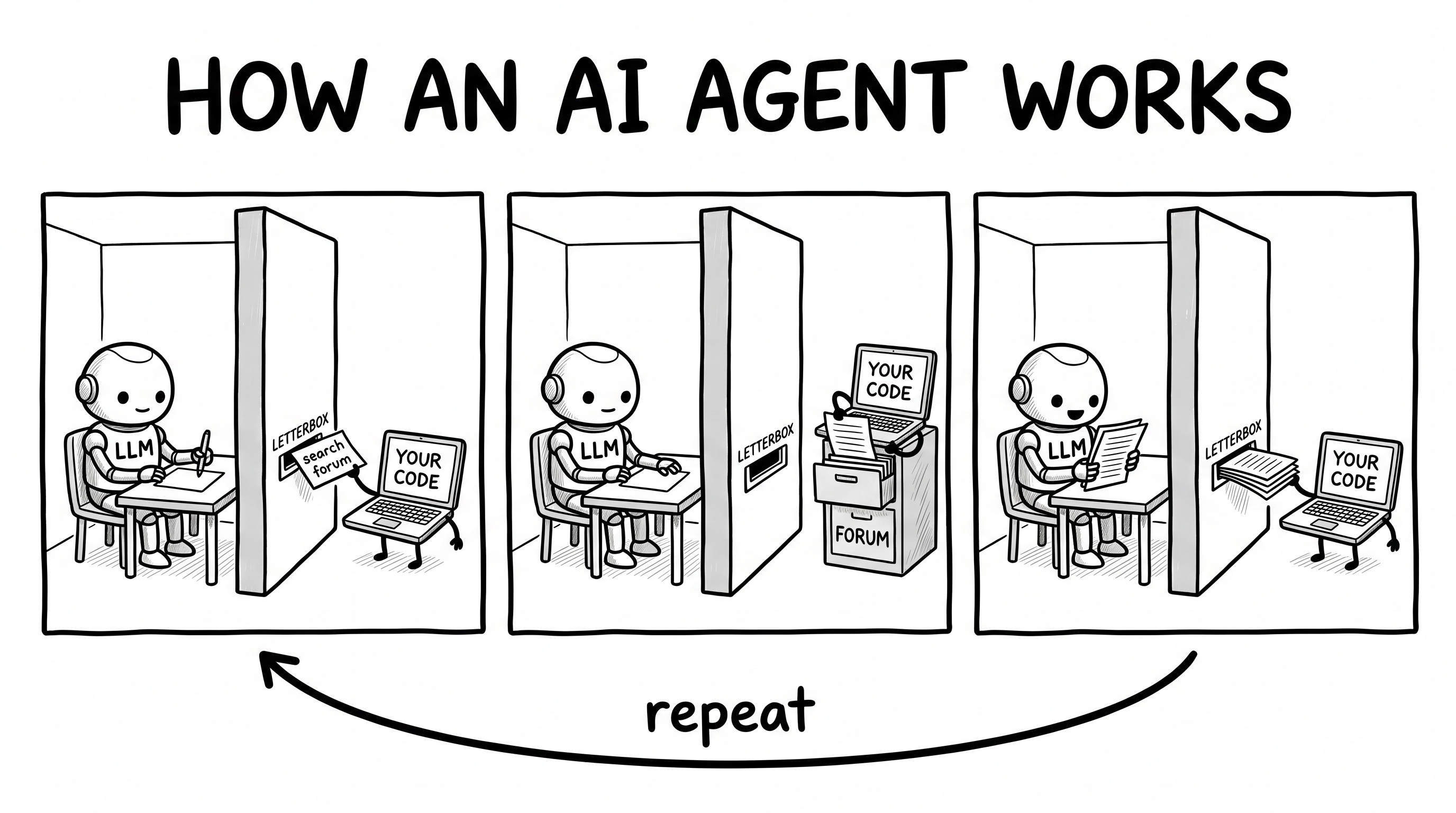
In code terms:
-
The note is a tool call. The model’s reply does not search anything. It only asks for a search, for example:
search(source="homeassistant", query="energy monitor wrong readings") -
Fetching it is your code running the tool. The model cannot reach the forum or run code. Your code does the search.
-
Passing the papers back is the next API call. Your code sends the results to the model, and the model writes its next note.
One trip through the slot is one round. The model picks its next step only after it reads the last result, so nobody knows in advance how many rounds a run will take. Three runs on the same niche took 8, 11 and 12. That is why it is a loop and not a fixed list of steps.
That is the whole loop. It is the easy part.
Coding assistants are the same shape
I built this agent with Claude Code, and it works the same way, just at a bigger scale. When it “runs” a shell command, the model only asks for it. The CLI on my laptop runs the command and sends the output back to the model.
| Part | My agent | Claude Code |
|---|---|---|
| Brain | any LLM with tool calling (I use Claude Haiku 5.5) | a large model (Claude Opus in my sessions) |
| Loop | run_research in loop.py, about 50 lines | the Claude Code CLI |
| Tools | search, fetch, record_pain, finish | Read, Edit, Bash, Grep, web search and more |
| Instructions | prompts/agent.md | its system prompt plus my CLAUDE.md |
| Context | the messages list, resent in full every round | the conversation, summarised when it gets too long |
| Can block a tool call | quote check, search limits, a finish that is rejected while evidence is thin and searches are left | permission prompts (I approve), hooks (my scripts) |
| Stop | the model must call a tool every round, so it ends only when finish is accepted, the step limit runs out, or an error stops it | the model answers without asking for a tool |
The bottom rows of that table are where the work is. The rest of this post is about them.
The description guides, the code enforces
The model never sees my code. For each tool it sees a name, a description and an input schema, and that is all it knows. So the description does a lot of work.
Inside the tool descriptions, each forum comes with one line about it, like homeassistant: smart home, home automation. For the niche “home energy monitoring”, the model picked that forum on its own. Nobody told it to.
The description of the record_pain tool, which saves a quote as evidence, says the thread must be fetched first. The model still sometimes tried to record quotes from threads it had not read, so the same rule also lives in code. In one run it looked like this:
model → record_pain(source="github", id=6016940046, quote="Energy dashboard - Sankey...")
code  ← REJECTED: Thread 6016940046 from github was not fetched. Fetch it first.
model → fetch(source="github", id=6016940046)
code  ← thread "Energy dashboard - Sankey Energy flows incorrect" (8 posts)
model → record_pain(source="github", id=6016940046, quote="the data in the Sankey energy flow diagram...")
code  ← recorded
That is the split: the description makes the mistake rare, and the code catches it when it happens anyway.
Freedom needs a fence
The trace of one run on “home energy monitoring”, from an earlier version of the agent with different search limits, shows why this is an agent and not a script.
In the first round the model sent two broad searches. One of the results described a dashboard value that jumps after a restart, on a sensor set to total_increasing, a Home Assistant setting. The next search used both of those words. The trace, trimmed:
model → search("energy monitoring not accurate")
model → search("energy dashboard sensor wrong values")
code  ← results, one of them: "...wrong value in energy dashboard after restart HA.
        Value is increased by 100% ... All sensors have state_class total_increasing."
model → search("energy dashboard values jump after restart total_increasing")
My niche contained neither “restart” nor total_increasing. The model picked them up from what it had just read. A fixed workflow would only do that if I had written code for it.
The same trace shows why that freedom needs a fence. After reading eight threads, the model tried two more searches, but it had used up its search limit. The code rejected both, and the model went on to record evidence instead.
So the model decides what to look for, and the code keeps the cost bounded with step and search limits. Keeping the result correct takes more than limits.
What makes a finding trustworthy
Every quote the model wants to record goes through the same checks, in this order:
- Is it real? The thread must have been fetched, and the quote must appear word for word in one of its posts. This is plain code, no model involved.
- Is it new? A thread already counted for that problem, or a quote already used for another problem, does not count again.
- Is it a complaint? An LLM judge reads the quote and the post around it and decides whether it describes a real problem.
- Does it fit? A second LLM judge checks that the quote belongs to the problem the model filed it under.
A problem only becomes a finding once quotes from at least two different threads pass all four checks. The model can call finish whenever it likes, but the code rejects it while there are fewer than three findings and searches are still left.
The model never writes the report. When the run ends, code builds it from the accepted quotes only, so nothing the model made up, and nothing that failed a check, can reach it.
What these checks do not cover: the forum posts are untrusted text from the internet, and they go straight into the model’s context. A post written to steer the agent (prompt injection) could change what it searches for or how it groups problems. The checks make sure every quote is real, not that the post behind it was written in good faith. I have not tested or defended against that yet.
Same agent, same niche, different answer
I ran the agent three times on “home energy monitoring”, same code, one run right after the other.
- Run 1 found 2 problems backed by 2 or more threads each.
- Run 2 found 3, and its own closing note says the grouping was loose: one thread about feed-in was filed under self-consumption.
- Run 3 found 1. The fit judge rejected the second quote for both of its other candidate problems, so they stayed at a single thread.
All three started with almost the same searches (energy monitoring, energy dashboard wrong, smart meter sensor on the Home Assistant forum). The difference came later: which threads the model read, how it grouped them, and what the judges accepted. The judges are LLM calls too, so they add their own variation.
So one run is not a reliable answer. If I compare niches by one run each, I am comparing noise.
That is why the agent also has a consensus mode: it runs several times from scratch and keeps only the threads most runs found. To measure how much runs differ, I ran it five times on another niche. 67% of the threads were found by at least two runs, and two runs had on average 43% of their threads in common (Jaccard overlap). That is one niche, so it is a first measurement, not a general number.
Cost: one line of caching, about 70% off the loop
Every round resends the whole conversation, so each round costs more than the last. One run took 11 rounds and sent about 205,000 input tokens.
Prompt caching fixes most of that with one parameter on the request. The API keeps the conversation so far, and the next round reads it from the cache at a tenth of the normal price, 90% off. Writing new messages to the cache costs a bit more than normal input (1.25x), and output tokens are not discounted at all, so the total saving ends up below 90%. In that run, the agent loop cost about $0.007 instead of $0.022, roughly 70% less.
One trap: with caching on, the input token count the API returns leaves out both the tokens read from the cache and the tokens written to it. To get the real input, add all three: uncached, read from the cache, and written to it. My first trace printed only the first one, which made runs look far cheaper than they were.
What this taught me about getting good at AI
“Good at using AI” is too vague to aim at, and it gets easier for everyone every month. What I am aiming at is narrower: building AI systems and proving they work. This project showed me what that takes.
- Know what happens underneath. On the first round the model has nothing but the niche name and the tool descriptions, so its opening searches come from its own guesses, not from data. The three runs above all opened with almost the same searches. The variety only starts once it reads results.
- Measure instead of trusting, then distrust the measurement. My complaint judge scored 26 of 27 on a labelled set. The one miss: it accepted a neutral line because the post described a real problem further down. And 27 cases are few: 26 of 27 means somewhere between about 80% and 99% (a 95% confidence interval), not 96%.
- Learn the failure modes by running things. In an earlier version, the last step, one model call that sums up the findings in a sentence, failed. The model thinks before answering by default, and those thinking tokens count against the output limit. With a 200-token cap, it spent them all thinking and never wrote the sentence. I found it in a trace, not in a blog post. That step now has more room, and if it fails, the run logs a warning instead of stopping.
- Be honest about who wrote what. An AI coding assistant wrote most of this code. I decided what the agent should do, read every change, and sent back the ones I could not follow until they were split into parts I could explain. While writing this post I checked every claim against the code and the run logs, and several of my own claims turned out wrong and were cut. If I cannot explain a file, I am a user of the tool, not good at it. So my rule is: no new features until I can explain each part in my own words.